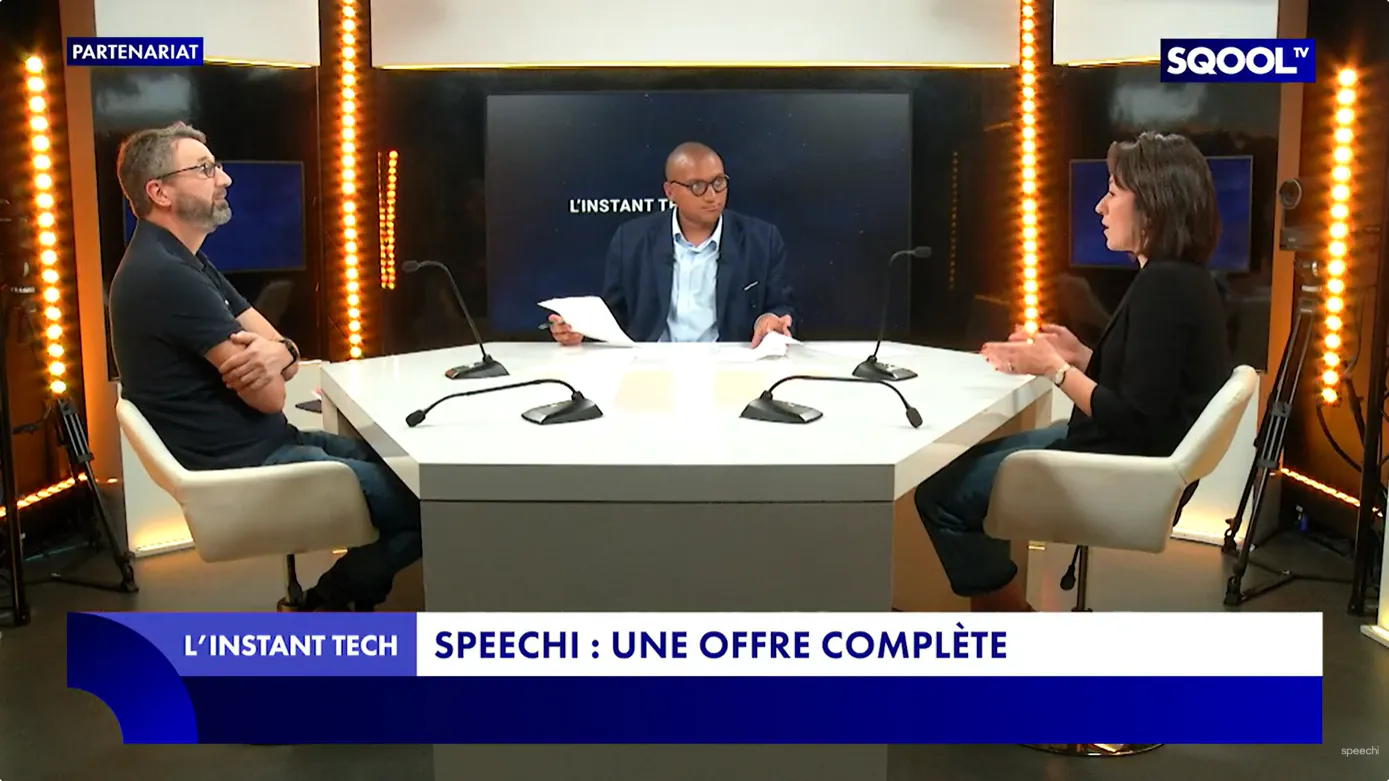
Didier Scellier, our CTO, and Claire Bienaimé, our Head of Marketing, were guests of Guillaume Ouattara on the SQOOL TV set for the program INSTANT TECH. For about twenty minutes, they discussed this new tool that is increasingly being adopted in classrooms: the interactive digital display, a field in which Speechi is the leader in France.
In this blog article, you will find the replay, the full written transcript, as well as additional resources to explore the topics discussed during the program in greater depth.
▶️ Replay of the Instant Tech program
Written transcript of the Instant Tech program
Key points from the program
- From chalkboard to interactive digital display
- A Speechi interactive display to free classrooms from PCs
- Simplifying the user experience of interactive displays
- Speechi’s commitment to technological sovereignty
- Speechi in French-speaking countries and beyond
- The Speechi Connect application ecosystem
- Teacher feedback driving our developments
- The role of the interactive display in the classroom
- The best of technology for schools with the SG3 display
- Interactive displays and inclusion
- Upcoming innovations from Speechi
- Impact on student attention: field feedback
- Speechi displays: long-lasting tools
- Equipping schools with Speechi interactive displays
- Learn more about Speechi
Guillaume Ouattara : “Hello everyone. I’m very happy to welcome you here on SQOOL TV for Instant Tech, the program that gives a voice to EdTech players to understand how their solutions can change the world—or at least the world of education.
Today, we’re going to talk about interactive digital displays and connected educational ecosystems. And to do so, we’re joined by the French leader in educational interactive displays, with equipment installed in one out of three equipped classrooms.
So how are these technologies transforming teaching? How can we simplify the use of digital tools for teachers and learners? And what innovations are coming next? These are just some of the questions we’ll be asking our two experts. First, Claire Bienaimé—hello.”
Claire Bienaimé : “Hello.”
Guillaume Ouattara : “You are Head of Marketing at Speechi, and we’re also joined by Didier Scellier. Hello Didier.”
Didier Scellier : “Hello Guillaume.”
Guillaume Ouattara : “You are Chief Technical and Innovation Officer at Speechi. What exactly is Speechi? What do you offer? How do you innovate? Let’s break it down. Claire, a simple question: Speechi is a well-established player in French EdTech. What do you concretely bring to schools today?”
Claire Bienaimé : “Indeed, we’ve been established since 2004 in French EdTech. We started with software, then gradually introduced interactive digital tools into classrooms—from projectors to screens. Today, we offer interactive displays designed to simplify teachers’ daily work and enhance interaction with students.“
Guillaume Ouattara : “An interactive display allows you to project everything: course materials, videos, images. Is it really the teacher’s main tool?”
Claire Bienaimé : “Exactly. It’s their flagship classroom tool.“
From chalkboard to interactive digital display (↑)
Guillaume Ouattara : “Let’s take a closer look. We’ll watch a short presentation video of Speechi tools. Back in a moment.
It’s interesting, Didier, because we remember early screens fixed to walls with bulky equipment that needed to be connected and synchronized. Maybe that’s what you offered decades ago. But now we’ve completely changed era: screens on wheels, like TVs, that you can even control with your fingers.”
Didier Scellier : “That’s a great observation. It’s interesting to look back: teaching started with chalkboards, then whiteboards, then projectors to display content, then interactive whiteboards—the predecessors of today’s interactive displays.
Now we’ve reached a stage where educational content is directly embedded in the screen. It not only allows projection but also interaction, giving much greater depth to exchanges and content sharing.”
A Speechi display that frees classrooms from PCs (↑)
Guillaume Ouattara : “What technologies do your screens have today? I understand you made a major technological shift around 2022?”
Didier Scellier : “Yes. There was a technological boom around 2018 with powerful electronic components. Screens are now like small computers, capable of running advanced programs.
This allows us to remove the need for a separate computer in the classroom. No more HDMI cable issues. Teachers can work directly on the screen. We don’t want to abruptly change habits, but gradually bring teachers to fully use the screen’s capabilities.”
Simplifying the user experience (↑)
Guillaume Ouattara : “Claire, I have a theory: when teachers deal with technology, everything suddenly feels complicated. How do you simplify the experience?”
Claire Bienaimé : “We provide training and field support. Teachers in France also benefit from digital coordinators (ERUN). On the marketing side, we create tutorials and simplify usage through software development.”
Guillaume Ouattara : “What does this bring in terms of teaching quality?”
Claire Bienaimé : “Teachers can choose their teaching methods freely. Our screens are not restrictive. They can access apps and media easily, with better fluidity and projection quality compared to projectors.”
Speechi and technological sovereignty (↑)
Guillaume Ouattara : “With current geopolitical contexts, technological sovereignty is crucial. Many solutions come from outside Europe. How does Speechi position itself?”
Didier Scellier : “This is a fundamental issue. We chose to develop and internalize our software in France—not just for sovereignty, but also for accessibility and ease of use.
Everything—from the screen to the software and data management—is developed by our teams in Lille. This ensures full control over data within France and Europe.”
Speechi internationally (↑)
Guillaume Ouattara : “You’re present in many French-speaking countries. Is your ambition to lead this market?”
Didier Scellier : “We’re already well positioned—leader in France, strong in Switzerland. Our tools naturally fit French-speaking education systems.
We also have success in emerging countries, especially in Eastern Europe, thanks to features like automatic translation that support multicultural environments.”
Speechi Connect ecosystem (↑)
Guillaume Ouattara : “We’ve now understood the challenges and how Speechi’s tools work. Let’s take a concrete look at how these solutions operate in a classroom. Innovation focus.
Didier Scellier, let’s get to the heart of the matter. Your main innovation at Speechi is based on a complete software ecosystem. There are the screens, but also Speechi Connect—what exactly is it?”
Didier Scellier : “Indeed, our goal wasn’t just to offer an interactive display. The idea was also to support teachers in their daily work by providing a full application ecosystem.
When we talk about an application ecosystem, we mean addressing all types of teachers: history and geography teachers, math teachers, English teachers, as well as primary and secondary school teachers.
We made a clear choice to create a curated catalog of applications that meets educational and pedagogical requirements. That means no advertising, content adapted to different age groups, and carefully selected tools.
Then we ensured that teachers could access this catalog very easily and quickly.
So, if I’m a math teacher, I should be able to access my math applications without being distracted by geography or English apps. We really worked on the user and application layer so that access is simple and efficient.”
Guillaume Ouattara : “And we actually have a video that presents this Speechi Connect solution. We’ll be right back.”
The role of the interactive display in the classroom (↑)
Guillaume Ouattara : “There’s also an important topic: screens and their place in young people’s lives.
The Speechi display and the Connect suite aren’t used 24/7 in the classroom. They’re complementary tools—used for projection and support.”
Claire Bienaimé : “That’s right. The screen is not on all day in the classroom.
And it’s not the same as a passive screen where a child watches cartoons or videos. Here, students interact with the tool—it’s a completely different experience.
I’d even go further: students learn to use technology responsibly.
It also helps reduce the digital divide between children who may not be supported at home or who don’t have access to devices like tablets or computers.”
The best of technology for schools: the SG3 display (↑)
Guillaume Ouattara : “We’ll come back to inclusion in a moment. Before that, Didier—what exactly is the SG3 display?”
Didier Scellier : “With our screens, we aimed to bring together the best available technology to ensure maximum fluidity.
Teachers are used to chalk or markers—it’s instant. So how do we replicate that immediacy on a digital screen? That’s the challenge.
We developed highly performant screens and also worked on adapted formats.
Most screens today are 16:9, but in classrooms, very large screens can be hard to reach at the top. So we developed ultra-wide 21:9 formats, allowing teachers to display content on the left and write on the right.”
Guillaume Ouattara : “A bit like traditional sliding boards in classrooms.”
Didier Scellier : “Exactly—more space to express, to display, to interact. Those are the key technical directions we focused on.”
Guillaume Ouattara : “Let’s see that in images. Claire, what stands out is the collaborative dimension. Is that central to the project?”
Claire Bienaimé : “Yes, absolutely. That’s the core principle of an interactive display: enabling multiple users to interact with it, both inside and outside the classroom.”
Interactive displays and inclusion (↑)
Guillaume Ouattara : “You mentioned inclusion. For example, can a student use a tablet to interact directly with the screen?”
Claire Bienaimé : “Yes, inclusion works in several ways.
Through Speechi Connect, we develop solutions that allow content to be shared from the screen to a tablet, where students can interact, take notes, and more.
For visually impaired students, having content on a personal device adapted to their needs is very helpful.
We also offer live captioning—either French-to-French for hearing-impaired students or translations, for example from French to Ukrainian for refugee students.
All these features make the interactive display one of the most inclusive digital tools available today.”
Future innovations at Speechi (↑)
Guillaume Ouattara : “We understand the current innovation—now let’s look ahead. What’s next for Speechi?”
Didier Scellier : “Technology has reached a relatively high level of maturity, so we’re not expecting major breakthroughs in hardware.
The future lies more in usage and ecosystem development.
Take artificial intelligence, for example. We see it as a support tool for teaching—not a replacement.
For instance, AI could help determine whether students have understood an exercise. That’s operational support, rather than generating content on the fly, since teachers already master their subject matter.
We focus on how technology can support teaching.”
Guillaume Ouattara : “And how could AI be integrated into screens?”
Didier Scellier : “We may not integrate it directly into the screen, as teachers are cautious about uncontrolled live AI use.
Instead, it can support teachers at home when preparing lessons.
It can also be used for analyzing student behavior—attention levels, understanding of content.
We’ve already started developing algorithms that help assess how well students grasp a concept, so teachers can revisit specific points if needed.”
Impact on student attention: field feedback (↑)
Guillaume Ouattara : “Student attention is a real challenge today. Have you measured the impact of Speechi screens?”
Didier Scellier : “What’s most valuable is teacher feedback.
Teachers who use interactive displays daily are unanimous: it’s a major added value.
It helps engage students who may struggle with traditional methods—again, as a complement, not a replacement—and creates a more balanced learning experience.”
Speechi screens: long-lasting tools (↑)
Guillaume Ouattara : “Claire, how long do these screens last?”
Claire Bienaimé : “We’re now seeing the renewal of our first installations, which are about ten years old.
Replacement is usually driven by the desire for new features rather than breakdowns.
Our after-sales service in northern France ensures quick repairs, and our screens have a high repairability index.”
Equipping schools with Speechi displays (↑)
Guillaume Ouattara : “How long does deployment take?”
Claire Bienaimé : “It’s quite fast. Usually, there’s a pilot phase, then deployment in waves.
Depending on the project, it can take just a few weeks to a few months to equip a school or even a network.”
Didier Scellier : “We rely on a strong network of distributors who already work with schools and local authorities, ensuring fast and efficient deployment.”
Guillaume Ouattara : “So how do schools get started?”
Didier Scellier : “Either by contacting us directly—we’ll connect them with local partners—or by going through existing distributors already working with the school.”